Thank you for choosing to drive safely! Turning on Driving Focus (also known as Do Not Disturb While Driving) will help you stay focused on the road by silencing or limiting text messages and other notifications while you’re driving.
Why Use It?
- Phone notifications can disrupt safe driving.
- Hiding notifications while driving can help you maintain your focus on the road and decrease crash risk.
- An average of 9 people are killed daily in the United States, and over 1,000 people are injured by distracted driving. Don’t let this be you or your loved ones.
- Many drivers say they are willing to give up checking notifications while driving but find it hard to resist the temptation.
Frequently Asked Questions
Find answers to the most frequently asked questions about Driving Focus below.
Won’t my loved ones be worried if I don’t respond?
Don't worry. Driving Focus can send auto-replies to let your loved ones know you are driving and will get back to them soon.
What if a loved one has an urgent message for me and needs to get through?
You can customize your auto-reply message to tell them how to get through to you.
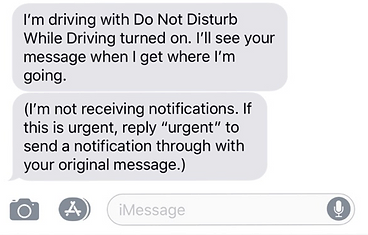
Will I lose messages that come through while I’m driving?
Fear not! Messages will be stored while you’re driving and displayed when you stop.
Can I access GPS and music apps while using the program?
Yes, these applications still work, even while Driving Focus is active.
Can I turn off the program if I’m a passenger?
Yes, just tap the I’m Not Driving button when the Driving Focus notification appears.
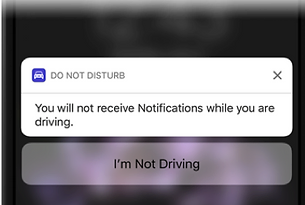
What if I want to turn it off while driving?
No problem! Just turn it off for the drive with a tap of a button on the home screen.